Solids Recovery Unit
Navigation: Models ➔ Mass Separation Models ➔ Solids Recovery Unit
| Flotation Cell | Solids Recovery Unit |
|---|
General Description
The Solids Recovery Unit can be used to model a range of solid recovery processes, including flotation, magnetic separation, and spiral separation. The model assumes perfect mixing of all incoming feed streams and, based on the user configuration, calculates the flow rate, temperature, and composition of material reporting to each product stream.
The Solids Recovery Unit is functionally similar to the Flotation Cell, with the key difference being that it optionally allows a Middlings stream to be connected.
When a Middlings stream is connected, two configuration pages are available, Concentrate and Middlings, and the model operates equivalently to two flotation cells arranged in series. In this configuration, the Concentrate represents Stage 1, and the Middlings represent Stage 2. See Flowchart.
Diagram

The diagram shows the default drawing of the Solids Recovery Unit, with all of the streams that can be connected to the unit. The physical location of the streams connecting to the unit is unimportant. The user may connect the streams to any position on the unit.
Inputs and Outputs
| Label | Required Optional |
Input Output |
Number of Connections | Description | |
| Min | Max | ||||
| Feed | 1 Required | In | 1 | 20 | The slurry feed/s to the unit |
| Concentrate | Required | Out | 1 | 1 | Concentrate outlet from the unit. |
| Middlings | Optional | Out | 0 | 1 | Middlings outlet from the unit. |
| Tailings | Required | Out | 1 | 1 | Tailings outlet from the unit. |
| Vent | Optional | Out | 0 | 1 | Vent Stream (Vapour only). |
Behaviour when Model is OFF
If the user disables the unit, by un-ticking the On tick box, then the following actions occur:
- The field MassFracToTails becomes visible and the user may set the fraction of the feed stream that reports to the 'Tailings' outlet. The default is 100%.
- All streams connected to the unit will flow straight out of the 'Tailings' outlet; unless the user has changed the above field from 100%. In which case the user defined fraction of the Feed will report to the 'Tailings' outlet, with the remainder reporting to the 'Concentrate' outlet;
- The 'Middlings' outlet (if connected) will not receive any flow while the model is off.
- No separation will occur.
- No sub-models, such as reactions, will occur.
So basically, the unit will be 'bypassed' without the user having to change any connections.
Model Theory
The Solids Recovery Unit is based on user defined variables that define the solids / liquids split.
Recovery Basis
As described in the General Description section, when both Concentrate and Middlings streams are connected, the unit operates equivalently to two concentrate only units arranged in series.
When specifying configuration data for the Concentrate and Middlings streams, the recovery values represent stage recoveries, not overall recovery. Specifically:
- Concentrate recoveries are calculated based on the total feed to the unit.
- For this stage:
- Solids stage recovery = solids recovery based on fresh feed = Concentrate / Feed
- Middlings recoveries are calculated based on the feed to the Middlings stage, which is equal to the total feed minus the Concentrate.
- For this stage:
- Solids stage recovery ≠ solids recovery based on fresh feed
- Solids recovery based on fresh feed = Middlings / (Feed − Concentrate)
Terminology used
- Concentrate Mass Pull is defined as the percentage of the total feed solids mass that reports to the Concentrate stream:
- [math]\displaystyle{ \text{Mass Pull (%)} = \frac{\text{Mass of solids in Concentrate}} {\text{Mass of solids in Feed}} \times 100 }[/math]
- Middlings Mass Pull is defined as the percentage of the solids fed to the Middlings separation that reports to the Middling stream:
- [math]\displaystyle{ \text{Mass Pull (%)} = \frac{\text{Mass of solids in Middlings}} {\text{Solids Feed to Middlings}} \times 100 }[/math]
- Where:
- [math]\displaystyle{ \text{Solids Feed to Middlings} = \text{Total feed solids} - \text{Solids reporting to Concentrate} }[/math]
Solids Recovery Methods
There are several Recovery methods available in this model:
| Recovery Method | Input Parameters | Calculated Parameters | Comments |
|---|---|---|---|
| Grade & Recovery |
|
|
Primary species can be defined either by selecting specific solid species or by applying Primary / Secondary / Excluded elemental rules. A species is considered recoverable if it contains the Primary and Secondary elements and does not contain the Excluded element. To ensure the unit can be solved, avoid over‑specifying recoveries. At least one species must remain unspecified to retain the necessary degree of freedom. |
| Mass Pull & Recovery |
|
| |
| Recovery Only Available from Build 140 (coming soon). |
|
|
Primary species can be defined either by selecting specific solid species or by applying Primary / Secondary / Excluded elemental rules. A species is considered recoverable if it contains the Primary and Secondary elements and does not contain the Excluded element. This method requires the user to define all species recoveries. Any species not designated as Primary or as an additional solid species can be grouped into the Gangue species category. |
| Size Recovery |
|
|
Only available when size distribution modelling is enabled and feed solids have size distributions. Recovery is set for each size fraction independently. |
Liquid Split Methods
There are also four Concentrate Liquid Split methods available in this model:
- Follow Solids - The split of liquids will be the same as the split of solids. This means that the liquid fraction in the outlet streams will be the same as the feed stream.
- Fraction of Feed Liquids - The user sets the fraction of liquid in the feed that will report to the product stream (Concentrate or Middlings).
- Note that the "Feed liquids" for the Middlings refers to liquids entering the Middling stage, thus excludes the amount reported to concentrate.
- Liquid in Product - The user sets the required fraction of liquid in the product stream (Concentrate or Middlings).
- Solids in Product - The user sets the required fraction of solids in the product stream (Concentrate or Middlings).
Examples
Grade & Recovery - Elemental Method
The example provided for the Grade and Recovery (Elements) Method on the Flotation Unit is also applicable here.
The configuration may be entered on the Concentrate tab, the Middlings tab, or both, depending on whether a Middlings stream is connected.
NOTE:
Feed to Middlings refers to the portion of the feed to the Solids Recovery Unit that remains after the solids reporting to the Concentrate have been removed.
- If a recovery of 50% is specified on both the Concentrate and Middlings tabs, the primary solids recovery calculated from the fresh feed to the unit will be: Concentrate: 50%, Middlings: 25%
- If the intended outcome is for 50% of the primary solids in the feed to report to the Concentrate and the remaining 50% to report to Middlings, the recovery values should instead be specified as: Concentrate: 50%, Middlings: 100%
Flowchart
The following shows the sequence of events in the model evaluation.

* The second split only occurs if the Middlings stream has been connected, otherwise the feed material is split into Vent (if connected), Concentrate and Tailings streams.
Data Sections
Summary of Data Sections
- Solids Recovery tab - Contains general information relating to the unit including Evaluation Block settings.
- PC - Optional tab that is visible if EB.Solubility.On and/or [email protected] is enabled on the first tab.
- RB - Optional tab, only visible if the Reactions are enabled in the Evaluation Block.
- EHX - Optional tab, only visible if the EnvironHX is enabled in the Evaluation Block.
- Evap - Optional tab that is visible if Evaporator is enabled.
- MU - Optional tab, or multiple tabs if more than 1 Makeup is selected. Only visible if one or more Makeups are enabled in the Evaluation Block.
- DB - Optional tab, or multiple tabs if more than 1 Discard Block is selected. Only visible if one of more Discard Blocks are enabled in the Evaluation Block.
- Concentrate - Allows configuration of split to Concentrate stream.
- Middlings - Optional tab, only visible if the Middlings stream outlet has been connected. Allows configuration of split to Middlings Stream.
- QFeed - Optional tab, visible if ShowQFeed is enabled. This and subsequent tab pages, e.g. QFeed.. and Sp, shows the properties of the Combined Feed stream. The tags in the QFeed tab are valid even when the ShowQFeed option is not selected.
- QMidsFeed - Optional tab, visible if ShowQMidsFeed is enabled. This and subsequent tab pages, e.g. QMidsFeed.. and Sp, shows the properties of the Feed to Middlings stream. The tags in the QMidsFeed tab are valid even when the ShowQMidsFeed option is not selected.
- QConcentrate - Optional tab, visible if ShowQConcentrate is enabled. This and subsequent tab pages, e.g. QConcentrate.. and Sp, shows the properties of the Concentrate stream. The tags in the QConcentrate tab are valid even when the ShowQConcentrate option is not selected.
- QMiddlings - Optional tab, visible if ShowQMiddlings is enabled. This and subsequent tab pages, e.g. QMiddlings.. and Sp, shows the properties of the Middlings stream. The tags in the QMiddlings tab are valid even when the ShowQMiddlings option is not selected.
- QTailings - Optional tab, visible if ShowQTailings is enabled. This and subsequent tab pages, e.g. QTailings.. and Sp, shows the properties of the Tailings stream. The tags in the QTailings tab are valid even when the ShowQTailings option is not selected.
- Info tab - Contains general settings for the unit and allows the user to include documentation about the unit and create Hyperlinks to external documents.
- Links tab, contains a summary table for all the input and output streams.
- Audit tab - Contains summary information required for Mass and Energy balance. See Model Examples for enthalpy calculation Examples.
Solids Recovery Page
Unit Type: SolidsRecovery - The first tab page in the access window will have this name.
| Tag (Long/Short) | Input / Calc | Description/Calculated Variables / Options |
| Tag | Display | This name tag may be modified with the Change Tag option. |
| Condition | Display | "OK" if no errors/warnings, otherwise lists errors/warnings. |
| ConditionCount | Display | The current number of errors/warnings. If condition is OK, returns 0. |
| GeneralDescription / GenDesc | Display | An automatically generated description for the unit. If text is entered in the 'EqpDesc' field on the Info tab (see below), this is displayed here. Otherwise, SysCAD will display the UnitType or SubClass. |
Requirements | ||
| On | Tickbox | If the model is switched off then no separation occurs and all the feed is sent to the tailings stream. If any vapour is present it is sent to the vent stream if it exists, otherwise it is also sent to the tailings stream. |
| MassFracToTails_WhenOff / MassFracToTails | Input | This field is only visible if the On tickbox is NOT ticked. This field allows the user to specify the fraction of the incoming streams that will flow to the tailings outlet when the unit is disabled. The remainder will be sent to the Concentrate outlet. No material will be sent to the middlings outlet. |
| ShowQFeed | Tick Box | QFeed and associated tab pages (e.g. Sp) will become visible, showing the properties of the combined feed stream. See Material Flow Section. This will be prior to any sub-model (e.g. reactions) actions. |
| ShowQMidsFeed | Tick Box | Only visible if the Middlings stream outlet has been connected. QMidsFeed and associated tab pages (e.g. Sp) will become visible, showing the properties of the stream after the concentrate stream has been removed, but prior to the splitting of the middlings and tailings streams. See Material Flow Section. |
| TrackStatus | Tickbox | Enable warning messages if requirements are not met. |
| OperatingP - NOTE: this pressure is applied to the (combined) feed, before sub-models (if any). DirectLink feeds, for example from Makeup Blocks, are excluded in determining the pressure. | ||
| Method | AutoDetect | If there are any liquids AND no vapours present in the feed, outlet streams will take the highest pressure of the feeds. Else (e.g. some vapours present) outlet streams will take the lowest pressure of the feeds. |
| LowestFeed | Outlet streams will take the lowest pressure of the feeds. | |
| HighestFeed | Outlet streams will take the highest pressure of the feeds. | |
| Atmospheric | Outlet streams will be at Atmospheric Pressure. The atmospheric pressure is calculated by SysCAD based on the user defined elevation (default elevation is at sea level = 101.325 kPa). The elevation can be changed on the Environment tab page of the Plant Model. | |
| RequiredP | Outlet streams will be at the user specified pressure. | |
| IgnoreLowMassFlow / IgnoreLowQm | Tick Box | This option is only visible if the AutoDetect, LowestFeed or HighestFeed methods are chosen. When calculating the pressure and temperature of the mixture, SysCAD will ignore the low flow feed streams should this option be selected. The low flow limit is set in the field below. |
| LowMassFlowFrac / LowQmFrac | Input | This field is only visible if the IgnoreLowQm option is selected. This is the amount required for any stream to contribute to the total flow when calculating the mixture pressure. For example, if the total feed to the unit is 10 kg/s, and this field is set to 1%. Then any feed streams with less than 0.1 kg/s will be ignored in the pressure calculations. |
| PressureReqd / P_Reqd | Input | This field is only visible if the RequiredP method is chosen. This is user specified pressure. |
| Result | Calc | The actual pressure used for the sum of the feeds which will also be the outlet pressure (unless further model options change the pressure). |
EB (Evaluation Block) | ||
| Solubility.On | Tickbox | Only visible if Solubility has been defined for at least one species in the project. Allows the user to switch on any predefined solubility curve to adjust the composition of material in the unit. |
| [email protected] | Tickbox | Only visible if Phase Change at Temperature has been defined for at least one species in the project and Plant Model - Species Tab - PhaseChange@T = OFF. Allows the user to switch on any predefined phase changes at temperature in the unit. |
| Makeups | Input | The number of Makeup Blocks required. Extra dropdown options Makeup1, Makeup2, etc. will be added to allow these to be switched on and off and prioritised in relation to the other sub-models. |
| MakeupX | List | This can be used to switch the Makeup Block (MU) on or off and prioritise it in relation to the other sub-models. If this is 'On' then the associated page, MUX becomes visible and may be configured. Note: This field is only visible if the entry for 'Makeups' is greater than 0. If there is one makeup then X=1. If there are two makeups, then X=1 and X=2, etc. |
| Reactions | List | Reaction Block (RB) - Enable or disable Reactions and set the sequence in relation to the other sub-models. If this is 'On' then the associated page, RB becomes visible and may be configured. Note: The user does not have to configure a reaction file, even if this block is checked. |
| EnvironHX | List | Environmental Heat Exchanger (EHX) - Enable or disable Environmental Heat Exchange and set the sequence in relation to the other sub-models. If this is 'On' then the associated page, EHX becomes visible and may be configured. Note: The user does not have to configure an environmental heat exchange, even if this block is checked. |
| Evaporation | List | Evaporation Block (Evap) - Enable or disable the Evaporator and set the sequence in relation to the other sub-models. If this is 'On' then the associated page, Evap becomes visible and may be configured. Note: The user does not have to configure an evaporator, even if this block is checked. |
| Discard | Input | The number of discard blocks required. Extra dropdown options Discard1, Discard2, etc. will be added to allow these to be switched on. |
| DiscardX | List | This can be used to switch the Discard Block (DB) on or off and prioritise it in relation to the other sub-models. If this is 'On' then the associated page, DBX becomes visible and may be configured. Note: This field is only visible if the entry for 'Discards' is greater than 0. If there is one discard then X=1. If there are two discards, then X=1 and X=2, etc. |
Options | ||
| ShowQFeed | Tickbox | When selected, the QFeed and associated tab pages (e.g. Sp) will become visible, showing the properties of the Combined Feed stream. See Material Flow Section. Tags in the QFeed tab can be used for controllers (e.g.: PGM files) and reports even when this option is not selected. |
| ShowQMidsFeed | Tickbox | When selected, the QMidsFeed and associated tab pages (e.g. Sp) will become visible, showing the properties of the Feed to Middlings stream. See Material Flow Section. Tags in the QMidsFeed tab can be used for controllers (e.g.: PGM files) and reports even when this option is not selected. |
| ShowQConcentrate | Tickbox | When selected, the QConcentrate and associated tab pages (e.g. Sp) will become visible, showing the properties of the Concentrate stream. See Material Flow Section. Tags in the QConcentrate tab can be used for controllers (e.g.: PGM files) and reports even when this option is not selected. |
| ShowQMiddlings | Tickbox | When selected, the QMiddlings and associated tab pages (e.g. Sp) will become visible, showing the properties of the Middlings stream. See Material Flow Section. Tags in the QMiddlings tab can be used for controllers (e.g.: PGM files) and reports even when this option is not selected. |
| ShowQTailings | Tickbox | When selected, the QTailings and associated tab pages (e.g. Sp) will become visible, showing the properties of the Tailings stream. See Material Flow Section. Tags in the QTailings tab can be used for controllers (e.g.: PGM files) and reports even when this option is not selected. |
Results | ||
| MiddlingsConnected | Calc | Available from Build 139.37074. Returns true (1) when the unit model has a Middlings stream connected. |
| The following table displays the flows and compositions of the Feed, Concentrate (Cons), Middlings (Mids) (if connected) and Tailings (Tails) streams. Note: These are for slurry only, vapours are excluded. | ||
| MassFlow / Qm | Calc | The total mass flow of the stream (excluding vapours). |
| VolFlow / Qv | Calc | The total volume flow of the stream (excluding vapours). |
| SolidMassFlow / SQm | Calc | The solids mass flow of the stream. |
| LiquidMassFlow / LQm | Calc | The liquid mass flow of the stream. |
| SolidFrac / Sf | Calc | The solid fraction of the stream (excluding vapours). |
| LiquidFrac / Lf | Calc | The liquid fraction of the stream (excluding vapours). |
| Temperature / T | Calc | The temperature of the stream. |
| Density / Rho | Calc | The total density of the stream (excluding vapours). |
| SolidConc | Calc | The solid concentration (mass of solids/density of slurry) of the stream. |
| SolidConc25 | Calc | The solid concentration at 25°C (mass of solids/density of slurry at 25°C) of the stream. |
| GridDisplay | Tick Box | This is a global selection, if this is selected, then where available, variables will display in a table format, if not selected, they will be listed in separate groups as a single list. |
Concentrate Page
Defines how material is split to the Concentrate stream.
- If the Middlings outlet is not connected, all material that does not report to the Concentrate stream is sent directly to the Tailings stream.
- If the Middlings outlet is connected, material that does not report to the Concentrate stream is distributed between the Middlings and Tailings streams according to the split defined on the Middlings Page. In other words, the feed to the Middlings stream is the total feed minus the material reporting to Concentrate.
| Tag (Long/Short) | Input / Calc | Description/Calculated Variables / Options |
Concentrate | ||
| RecoveryMethod | Grade & Recovery | The user sets the recovery and grade of the required solid species in the concentrate stream. This does not require any Size distribution data. |
| Mass Pull & Recovery | The user sets the recovery of the required solid species as well as the mass pull of solids to the concentrate stream. This does not require any Size distribution data. | |
| Recovery Only | Available from Build 140 (coming soon). The user specifies the recovery of all solid species reporting to the concentrate stream. This includes the recovery defined for the primary solid species, any additional solid species, and the gangue solids (all remaining, unspecified species). This method does not require any size distribution data. | |
| Size Recovery | The user sets the fractional recovery to the concentrate stream for each individual size interval for all species that do have size distributions. The project must contain Size distribution data. | |
| Primary Solid | ||
| Method | Solid Species | User may choose a solid species as the primary species for the recovery calculations. |
| Element | The user may choose to base the recovery to concentrate calculations on an elemental basis. | |
| PrimarySolid | List | Only visible if the user has selected Solid Species for Method. List of solid species in the current project which can be chosen as the primary solid. |
| PrimaryElement | List | Only visible if the user has selected Element for Method. List of elements in the current project which can be chosen as part of the primary solids species (based on all solid species in the project). |
| The following two fields are only visible when the Recovery Method is set to Grade & Recovery, Mass Pull & Recovery, or Recovery Only, and the Method is set to Element. | ||
| SecondaryElement | List | Optional: List of elements in the current project which can be chosen to restrict the primary solid species. If a Secondary Element is chosen, then only solid species that contain BOTH the Primary AND Secondary elements will be classified as Primary Solids. |
| ExcludeElement | List | Optional: List of elements in the current project which can be chosen to restrict the primary solid species. If an Exclude Element is chosen, then only solid species that contain the Primary (and Secondary, if selected) element, but NOT the Excluded element will be classified as Primary Solid Species. (Please see the example in Model Theory above) |
| PrimaryRecoveryReqd | Input | Only visible if the user has selected Grade & Recovery or Mass Pull & Recovery for Recovery Method. Mass Recovery of the primary solid, or element, from the feed stream to the concentrate stream. |
| PrimaryGradeReqd | Input | Only visible if the user has selected Grade & Recovery for Recovery Method. Mass Fraction of the primary solid, or element, in the concentrate stream. |
| MassPullReqd | Input | Only visible if the user has selected Mass Pull & Recovery for Recovery Method. Mass Fraction of all solids in the feed stream, which report to the concentrate stream. |
| GangueRecoveryReqd | Input | Available from Build 140 (coming soon). Only visible if the user has selected Recovery Only for Recovery Method. Allows the user to specify the recovery of the gangue solid species from the feed stream to the concentrate stream. Gangue solids are all species not designated as primary or additional solid species. |
| Additional Solid Species to concentrate (Only visible when the Recovery Method is set to Grade & Recovery, Mass Pull & Recovery, or Recovery Only.) | ||
| SolidSpeciesCount / SolSpCount | Input | Optional: The number of additional solid species to be specified with recoveries or grades. Up to 25 may be specified. |
| SecondaryMethod | (Only visible when the Recovery Method is set to Grade & Recovery, Mass Pull & Recovery, and SolSpCount is non-zero) | |
| Recovery to Product | The user can specify the recovery of additional solid species to the concentrate stream. | |
| Grade in Product | The user can specify the grade of additional solid species in the concentrate stream. | |
| For each additional solid species: | ||
| SolidSpecies / SolidSp | List | List of solid species in the current project which can be chosen as an additional species. |
| RecoveryReqd | Input | Only visible if the user has selected Recovery to Product for Secondary Method. Mass recovery of the additional species to the concentrate stream. |
| GradeReqd | Input | Only visible if the user has selected Grade in Product for Secondary Method. Grade (mass fraction) of the additional species in the concentrate stream. |
| concentrate Liquid Split | ||
| LiquidSplitMethod | Follow Solids | The split of liquids will be the same as the split of solids. This means that the liquid fraction in the outlet streams will be the same as the feed stream. |
| Fraction of Feed Liquids | User can specify the fraction by mass of liquid in the feed stream that is recovered to the concentrate stream. | |
| Liquid in Product | User can specify the fraction by mass of liquid in the concentrate stream. | |
| Solids in Product | User can specify the fraction by mass of solids in the concentrate stream. | |
| LiquidToconcentrate | Input | Only visible if user has selected Fraction of Feed Liquids for LiquidSplitMethod. Fraction by mass of liquid in feed stream that is recovered to the concentrate stream. |
| ConcentrateLiqFracReqd / LiqFracReqd | Input | Only visible if user has selected Liquid in Product for LiquidSplitMethod. Fraction by mass of liquid in the concentrate stream. |
| ConcentrateSolFracReqd / SolFracReqd | Input | Only visible if user has selected Solids in Product for LiquidSplitMethod. Fraction by mass of solids in the concentrate stream. |
Recovery | ||
| The following section is only visible if the user has selected Size Recovery for Recovery Method. | ||
| The following table displays the recoveries of each solid species in the project which has its own size distribution at each size interval. | ||
| Recovery.Ix.Species | Input | Mass Recovery of the relevant solid species in size interval Ix from the Feed stream to the concentrate stream. |
Results (concentrate) | ||
| PrimariesFound | Calc | List of all solid species in the project that meet the criteria specified for the primary solid species. When using the Element Method, the primary solids may consist of multiple solid species. The Primary Recovery and Primary Grade calculations are based on all species listed here. |
| PrimaryRecovery | Calc | The actual recovery to concentrate achieved for the primary species. |
| PrimaryGrade | Calc | The actual percentage grade achieved for the primary species. When using solid species, the primary grade is defined as the combined solids fraction of all primary species in the concentrate. When using the Element Method, the primary grade is defined as the elemental solids fraction in the concentrate. |
| ProdMassPull | Calc | The actual solid mass pull to the concentrate stream achieved. See Mass Pull |
| SecondaryRecovery | Calc | The total recovery of all secondary species (user-defined additional Solid Species). |
| GangueRecovery | Calc | The total recovery of all gangue species. |
| SolidFrac / Sf | Calc | The solid fraction of the concentrate stream. |
| LiquidFrac / Lf | Calc | The liquid fraction of the concentrate stream. |
| FeedLiqToProd | Calc | The fraction of liquids in the feed which passes to the concentrate stream. |
| AdditionalSolids | Calc | Only visible when the Recovery Method is set to Grade & Recovery, Mass Pull & Recovery, or Recovery Only. List of all solid species in the project specified as additional species. |
| GangueSpecies | Calc | List of all solid species in the project which have not been specified as either primary or additional species. |
Middlings Page
Defines how material is split to the Middlings stream.
- This page is only visible when the Middlings stream outlet is connected.
- When the Middlings stream is present, the solids recovery unit operates as two single separation stages in series. The feed to the solids recovery unit is first split to the Concentrate stream. Material that does not report to Concentrate is then distributed between the Middlings and Tailings streams according to the split defined on this page.
- In other words, the feed to the Middlings stream is equal to the total feed minus the material reported to Concentrate.
| Tag (Long/Short) | Input / Calc | Description/Calculated Variables / Options |
Middlings | ||
| RecoveryMethod | Grade & Recovery | The user sets the recovery and grade of the required solid species in the middlings stream. This does not require any Size distribution data. |
| Mass Pull & Recovery | The user sets the recovery of the required solid species as well as the mass pull of solids to the middlings stream. This does not require any Size distribution data. | |
| Recovery Only | Available from Build 140 (coming soon). The user specifies the recovery of all solid species reporting to the middlings stream. This includes the recovery defined for the primary solid species, any additional solid species, and the gangue solids (all remaining, unspecified species). This method does not require any size distribution data. | |
| Size Recovery | The user sets the fractional recovery to the middlings stream for each individual size interval for all species that do have size distributions. The project must contain Size distribution data. | |
| Primary Solid | ||
| Method | Solid Species | User may choose a solid species as the primary species for the recovery calculations. |
| Element | The user may choose to base the recovery to middlings calculations on an elemental basis. | |
| PrimarySolid | List | Only visible if the user has selected Solid Species for Method. List of solid species in the current project which can be chosen as the primary solid. |
| PrimaryElement | List | Only visible if the user has selected Element for Method. List of elements in the current project which can be chosen as part of the primary solids species (based on all solid species in the project). |
| The following two fields are only visible when the Recovery Method is set to Grade & Recovery, Mass Pull & Recovery, or Recovery Only, and the Method is set to Element. | ||
| SecondaryElement | List | Optional: List of elements in the current project which can be chosen to restrict the primary solid species. If a Secondary Element is chosen, then only solid species that contain BOTH the Primary AND Secondary elements will be classified as Primary Solids. |
| ExcludeElement | List | Optional: List of elements in the current project which can be chosen to restrict the primary solid species. If an Exclude Element is chosen, then only solid species that contain the Primary (and Secondary, if selected) element, but NOT the Excluded element will be classified as Primary Solid Species. (Please see the example in Model Theory above) |
| PrimaryRecoveryReqd | Input | Only visible if the user has selected Grade & Recovery or Mass Pull & Recovery for Recovery Method. Mass Recovery of the primary solid, or element, from the feed to middlings to the middlings stream. |
| PrimaryGradeReqd | Input | Only visible if the user has selected Grade & Recovery for Recovery Method. Mass Fraction of the primary solid, or element, in the middlings stream. |
| MassPullReqd | Input | Only visible if the user has selected Mass Pull & Recovery for Recovery Method. Mass Fraction of all solids in the feed to middlings, which report to the middlings stream. |
| GangueRecoveryReqd | Input | Available from Build 140 (coming soon). Only visible if the user has selected Recovery Only for Recovery Method. Allows the user to specify the recovery of the gangue solid species from the feed to middlings to the middlings stream. Gangue solids are all species not designated as primary or additional solid species. |
| Additional Solid Species to middlings (Only visible when the Recovery Method is set to Grade & Recovery, Mass Pull & Recovery, or Recovery Only.) | ||
| SolidSpeciesCount / SolSpCount | Input | Optional: The number of additional solid species to be specified with recoveries or grades. Up to 25 may be specified. |
| SecondaryMethod | (Only visible when the Recovery Method is set to Grade & Recovery, Mass Pull & Recovery, and SolSpCount is non-zero) | |
| Recovery to Product | The user can specify the recovery of additional solid species to the middlings stream. | |
| Grade in Product | The user can specify the grade of additional solid species in the middlings stream. | |
| For each additional solid species: | ||
| SolidSpecies / SolidSp | List | List of solid species in the current project which can be chosen as an additional species. |
| RecoveryReqd | Input | Only visible if the user has selected Recovery to Product for Secondary Method. Mass recovery of the additional species to the middlings stream. |
| GradeReqd | Input | Only visible if the user has selected Grade in Product for Secondary Method. Grade (mass fraction) of the additional species in the middlings stream. |
| middlings Liquid Split | ||
| LiquidSplitMethod | Follow Solids | The split of liquids will be the same as the split of solids. This means that the liquid fraction in the outlet streams will be the same as the feed to middlings. |
| Fraction of Feed Liquids | User can specify the fraction by mass of liquid in the feed to middlings that is recovered to the middlings stream. | |
| Liquid in Product | User can specify the fraction by mass of liquid in the middlings stream. | |
| Solids in Product | User can specify the fraction by mass of solids in the middlings stream. | |
| LiquidTomiddlings | Input | Only visible if user has selected Fraction of Feed Liquids for LiquidSplitMethod. Fraction by mass of liquid in feed to middlings that is recovered to the middlings stream. |
| MiddlingsLiqFracReqd / LiqFracReqd | Input | Only visible if user has selected Liquid in Product for LiquidSplitMethod. Fraction by mass of liquid in the middlings stream. |
| MiddlingsSolFracReqd / SolFracReqd | Input | Only visible if user has selected Solids in Product for LiquidSplitMethod. Fraction by mass of solids in the middlings stream. |
Recovery | ||
| The following section is only visible if the user has selected Size Recovery for Recovery Method. | ||
| The following table displays the recoveries of each solid species in the project which has its own size distribution at each size interval. | ||
| Recovery.Ix.Species | Input | Mass Recovery of the relevant solid species in size interval Ix from the Feed stream to the middlings stream. |
Results (middlings) | ||
| PrimariesFound | Calc | List of all solid species in the project that meet the criteria specified for the primary solid species. When using the Element Method, the primary solids may consist of multiple solid species. The Primary Recovery and Primary Grade calculations are based on all species listed here. |
| PrimaryRecovery | Calc | The actual recovery to middlings achieved for the primary species. |
| PrimaryGrade | Calc | The actual percentage grade achieved for the primary species. When using solid species, the primary grade is defined as the combined solids fraction of all primary species in the middlings. When using the Element Method, the primary grade is defined as the elemental solids fraction in the middlings. |
| ProdMassPull | Calc | The actual solid mass pull to the middlings stream achieved. See Mass Pull |
| SecondaryRecovery | Calc | The total recovery of all secondary species (user-defined additional Solid Species). |
| GangueRecovery | Calc | The total recovery of all gangue species. |
| SolidFrac / Sf | Calc | The solid fraction of the middlings stream. |
| LiquidFrac / Lf | Calc | The liquid fraction of the middlings stream. |
| FeedLiqToProd | Calc | The fraction of liquids in the feed which passes to the middlings stream. |
| AdditionalSolids | Calc | Only visible when the Recovery Method is set to Grade & Recovery, Mass Pull & Recovery, or Recovery Only. List of all solid species in the project specified as additional species. |
| GangueSpecies | Calc | List of all solid species in the project which have not been specified as either primary or additional species. |
Recovery Section
If the user selects Size Recovery as the Recovery Method (in Concentrate or Middlings), then the Recovery table will be visible. This table display the size intervals for all solids species in the project which has its own size distribution. The user must enter the recovery for each size interval, as shown below:
(PSD in Descending Order) 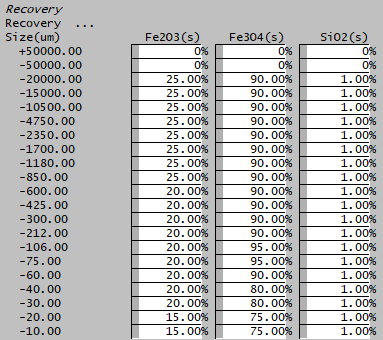

In the example shown above, the flotation cell is used to recover Fe3O4 species as can be seen by the higher recoveries specified for this species. The other species are gangue solids that is recovered to the concentrate in smaller fractions.
Adding this Model to a Project
Add to Configuration File
Sort either by DLL or Group:
| DLL: | Separation.dll |
→ | Units/Links | → | Separation: Solids Recovery | |
| or | Group: | Mass Separation |
→ | Units/Links | → | Separation: Solids Recovery |
See Model Selection for more information on adding models to the configuration file.
Insert into Project Flowsheet
| Insert Unit | → | Separation | → | Solids Recovery |
See Insert Unit for general information on inserting units.
Hints and Comments
- If there are some solids species which the user does not want to send to the product stream (concentrate or middlings) at all, then include them as additional solid species with a recovery of 0%.
- It is possible to over-specify the problem, i.e. if the user sets Additional Solid Species to recover to the product, this may prevent the Required Grade or Mass Pull from being met.
- Note: The Required Recovery will always be achieved, but the Grade/Mass Pull do depend on feed conditions and the user defined parameters.
- If the Size Recovery Method is selected and there is no PSD Quality data in the feed then the model does not perform any calculations and behaves as if it was off.
- If there is no vent stream, all vapours will be sent to the concentrate stream.
- The user cannot choose the same species as both a primary solid species and an additional solid species or twice as an additional solid species. In either of these cases the model will not run and the user will be given an error message.
Example Project
Please see Milling and Magnetic Separation Project.