Windows
Navigation: User Guide ➔ Windows (Getting Around SysCAD)
| Application Window | Message Window | Graphics Window | Access Window | Explorer Window | Trend Window | Controls Window | TagList Window | Project Window |
|---|
Latest SysCAD Version: 13 May 2026 - SysCAD Build 139.37082
SysCAD Application Window
A SysCAD project will contain a number of documents with windows or views representing this information. The key representation of the model is the Graphics Window which is typically used to construct a model in a project. Other windows are used to display information or assist in the process of solving a model, reporting information, navigating a model, etc.
The picture below shows the various window for an example project, please note that user can re-arrange the layouts of any of these windows at anytime. User can also minimise any of these windows if not in use such as the trend window.
(The image shown below is an interactive image, clicking on the image sections will jumps to the help page with more information.)
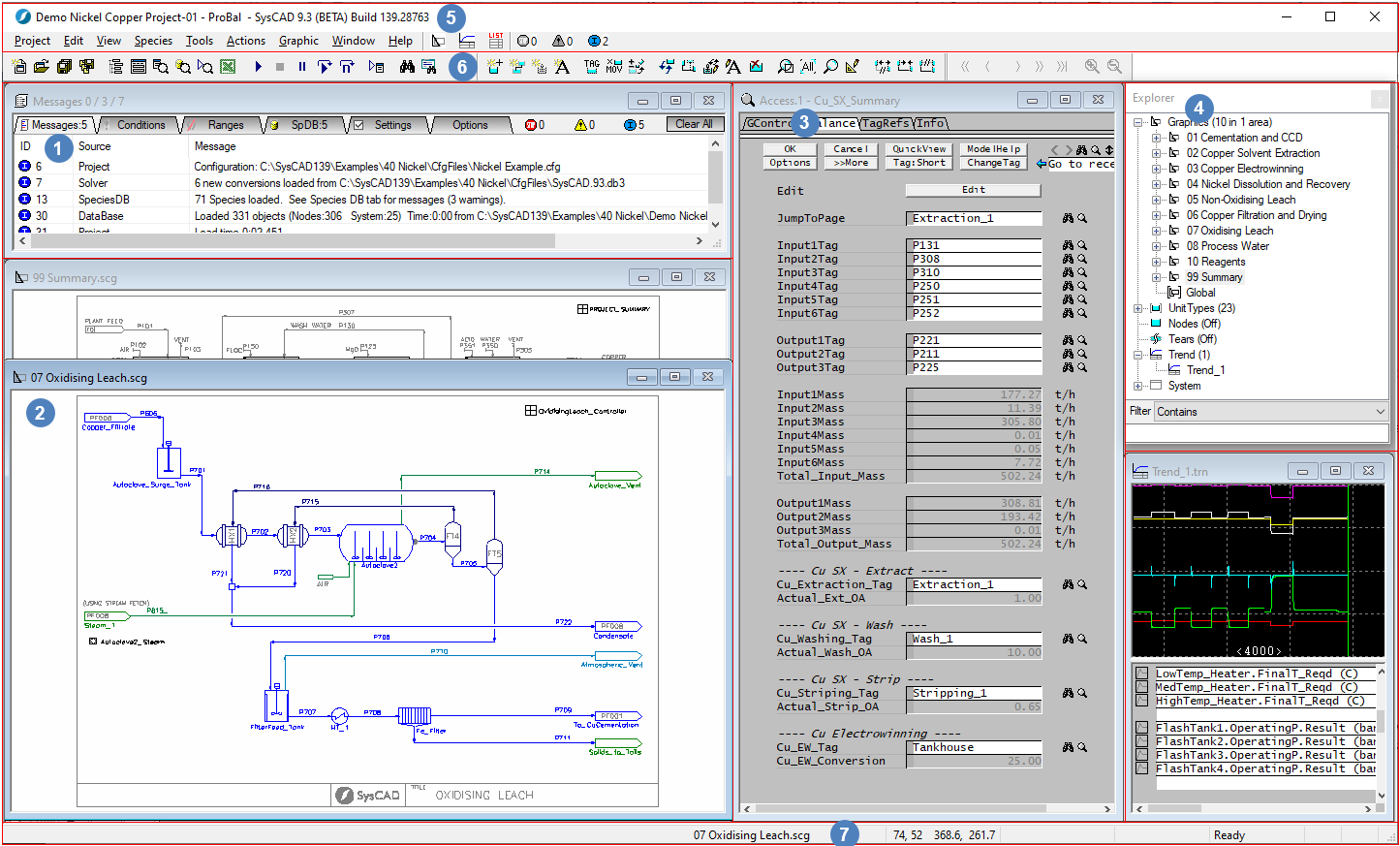

Some of the main windows in SysCAD are:
| Application Window | Message Window | Graphics Window | Access Window | Explorer Window | Result Viewing Document Windows |
|---|---|---|---|---|---|
| Title bar, status bar and application background options. |  For various user and model condition messages. |
 For graphical representation of the model as flowsheet(s). |
 For individual unit model information (configuration and results). |
 For selecting windows and finding model tags. |
These are optional Windows for viewing results in SysCAD, these include: Trend Window, Controls Window and TagList Window. |
Title Bar, Menu and Hot Jumps
 The SysCAD application Title Bar, Menu and Hot Jumps are shown below:

- The SysCAD project name, Operation Mode and SysCAD Build number is displayed at the top left hand corner of the main SysCAD Window.
- In the example above, the project currently opened is called Demo Nickel Copper Project(.spf) and it is running in the ProBal simulation mode.
- The Recent Graphics Window
 , Recent Trend Window
  and Recent TagList Window
  buttons bring the most recently accessed Graphics/Trend/TagList Window into focus.
 - Subsequent clicks of the , or buttons will scroll through the Graphics/Trend/TagList windows in the order shown in the Explorer Window, which is usually sorted by name. Holding down Alt will scroll through them in reverse order.


Tool Bar
 Toolbars manages and organises commonly used commands in SysCAD in logical ways so that you can find and use them quickly. See General Options Toolbars
Status Bar
 At the bottom of the SysCAD application window there is a Status Bar .
Application Window Background Pop-up Options
Right clicking on the SysCAD background (the grey areas on the main application window) will bring up a pop-up list of short-cut commands. There are three sets of commands available to the user, depending on the state of the SysCAD project. The short-cut commands available from Build 139.33457 are:
1) This set of short-cut commands are visible when SysCAD is in the Start mode, (SysCAD project is not opened).
 |
|
2) This set of short-cut commands are visible when SysCAD project is opened, and SysCAD is in the Edit mode.
 |
|
3) This set of short-cut commands are visible when SysCAD project is opened, and SysCAD is in the Solve mode.
 |
|
NOTE: A "Command Window" also exists in SysCAD, and usually remains minimised. SysCAD operating commands (primarily related to Graphics) may be entered here. However, it is seldom necessary to enter commands directly in this window as all required functionality is available through menus and toolbars. The command window will be removed in future versions of SysCAD.