Makeup Source
Navigation: Models ➔ Other General Models ➔ Makeup Source
| Makeup Source | Makeup Block (MU) | Discard Sink | Discard Block (DB) | DirectLink | Flange | Tear |
|---|
General Description
- The Makeup Source acts as an infinite source of material.
- A Makeup Source is used to provide material to any number of Makeup Blocks which are enabled in units in the project.
- The Makeup Source is configured in almost the same way as a Feeder, with the user specifying the mass fractions of the species and the required temperature. However, the user does not specify the amount of material flowing from the unit, as this is the sum of the Makeup Block requirements.
- The Makeup Source will supply the amount of material as required by each Makeup Block and will display the individual flow to each unit, as well as the total flow required.
- The Makeup Source is NOT connected to the Makeup Blocks by a normal link. SysCAD creates a DirectLink which is automatically drawn at the Makeup Block. It is important to note that no links can be connected to the Makeup Source.
Video Links
The following video is part of the Tutorial showing users how to insert and configure a Makeup Source:
Diagram

The Makeup Source unit may be placed on any page in a simulation model. It can then be used on all pages in a model.
Inputs and Outputs
The Makeup Source does not have any inputs or outputs.
The Makeup Block(s) are connected indirectly by selecting the name of the required Makeup Source from a drop down list of available makeup sources in the project as shown below:

Data Sections
- MakeupSource tab - this is the first Tab and is used to configure the following:
- Set the Temperature and Pressure (if required) of the material from the source; or
- Copy the composition, temperature and pressure (all three, or a combination of them) from another unit.
- Total tab - Shows results.
- VLE - Optional tab that is visible if Vapour Liquid Equilibrium is enabled on the first tab.
- Content tab - Optional tab only shown if ShowContent option on first tab page is ticked. Contains data on the material from the Source and may be spread across one or two Tabs, depending on the project and the selected views.
- WQ - Optional tab, this tab is only visible if WaterQualities in the Plant Model - Views tab page is ticked.
- DSp - this Tab contains the breakdown of the species contained in the project. This may be spread across one or two Tabs, depending on the number of species in the project.
- DLockup - Optional tab that is visible if Qualities - "Lockup.Action = Create". Please see LockUp for more information.
- DTrack - Optional tab that is visible if Qualities - "MatTrack.Action = Create". Please see Material Tracking for more information.
- DSz - Optional tab that is visible if Qualities - "SzDist.Action = Create". This allows the user to define the Size Distribution(s) for the solids in the unit. Please see Size Distribution (PSD) for more information. The methods of defining the Size Distribution can be found in Size Distribution Definition.
- DSSA - Optional tab that is visible if Qualities - "SzSSA.Action = Create". Please see Specific Surface Area (SSA) for more information.
- QProd - This and subsequent tab pages, e.g. QProd.. and Sp, shows the properties of the stream out of the unit.
- Info tab - Contains general settings for the unit and allows the user to include documentation about the unit and create Hyperlinks to external documents.
- Links tab, contains a summary table for all the input and output streams.
- Audit tab - Contains summary information required for Mass and Energy balance. See Model Examples for enthalpy calculation Examples.
The data sections and variable names are described in detail in the following table.
MakeUp Source Page
Unit Type: MakeupSource - The first tab page in the access window will have this name.
| Tag (Long/Short) | Input / Calc | Description / Calculated Variables |
| Tag | Display | This name tag may be modified with the Change Tag option. |
| Condition | Display | "OK" if no errors/warnings, otherwise lists errors/warnings. |
| ConditionCount | Display | The current number of errors/warnings. If condition is OK, returns 0. |
| GeneralDescription / GenDesc | Display | An automatically generated description for the unit. If text is entered in the 'EqpDesc' field on the Info tab (see below), this is displayed here. Otherwise, SysCAD will display the UnitType or SubClass. |
MakeupSource Operation Selection | ||
| Operation | General | This operation allows user full control for setting all available MakeupSource options. Composition Fetch and full species list are available in the DSp tab. |
| Solids | This operation mode will apply a solids filter to the DSp tab, all species in other phases are forced to zero. This operation mode does not allow composition Fetch. VLEquilibrium is not available as it does not apply to solids. | |
| Liquids | This operation mode will apply a liquids filter to the DSp tab, all species in other phases are forced to zero. This operation mode does not allow composition Fetch. VLEquilibrium selection is limited to Saturated or subcooled liquid. | |
| Vapours | This operation mode will apply a vapours filter to the DSp tab, all species in other phases are forced to zero. This operation mode does not allow composition Fetch. VLEquilibrium selection is limited to Saturated or Superheated vapour mixtures. NOTE: for mixed phases please use the General Operation mode. | |
| Slurry | This operation mode will apply a solids & liquids filter to the DSp tab, all species in other phases are forced to zero. This operation mode does not allow composition Fetch. VLEquilibrium selection is limited to Saturated or subcooled liquid. | |
| Water | This operation mode will apply a water filter to the DSp tab, the only species shown is Water. This operation mode does not allow composition Fetch. VLEquilibrium selection is limited to Saturated or subcooled liquid. NOTE: for non saturated conditions please use the General Operation mode. | |
| Steam | This operation mode will apply a Steam filter to the DSp tab, the only species shown is Steam. This operation mode does not allow composition Fetch. VLEquilibrium selection is limited to Saturated or Superheated pure steam. NOTE: for steam mixed with other vapours use the Vapours or General Operation mode. | |
| PlantModel Air | This operation will fetch the Global air specification from Plant Model - Environment Tab, Air Composition section into the DSp Tab. | |
| PlantModel DryAir | This operation will fetch the Global dry air specification from Plant Model - Environment Tab, DryAir Composition section into the DSp Tab. | |
| Stream Fetch | This operation will allow user to fetch the stream T, P, and composition information from another stream. User must specify the source stream, e.g.: P_104.Qo OR ROM_STOCKPILE.QFeed. | |
| Content Fetch | This is available for dynamic simulation only. This operation will allow user to fetch the T, P and composition information from another content (such as tank). User must specify the source, e.g.: Tank1.Content. | |
| MakeupSrc Fetch | This operation will allow user to fetch the stream information from another MakeupSrc. A DirectLink pipe is not created between the other MakeupSrc and this Makeup Source, and the flow used is NOT reflected in the other MakeupSrc total. The other MakeupSrc is used as a template definition for Composition, T and P. | |
| Link to MakeupSrc | This operation will allow user to draw the flow from another MakeupSrc, the DirectLink is automatically created similar to a Makeup block. The advantage of this operation mode is that the other MakeupSrc is the source of the material, a DirectLink stream is created and the flow used is reflected in the other MakeupSrc total. This is ideal for cascaded Makeup Sources, for example a single Makeup Source for total water supply, then intermediate Makeup Sources for each process area for area water demand. | |
| Source | Input |
Visible with the Stream Fetch operation. User specified the source stream, e.g.: P_104.Qo OR ROM_STOCKPILE.QFeed |
| MakeupSrc | DropList | Visible with the MakeupSrc Fetch operation. User selects the available makeup source unit from the list. NOTE: If setting the makeup source via a controller or Excel, use the tag name of the makeup source. This is a string variable and cannot be set by integer index. |
| SrcLink... (This group is only visible with Link to MakeupSrc operation mode) | ||
| MakeupSrc | DropList | Visible with the Link to MakeupSrc operation. User selects the available makeup source unit from the list. NOTE: If setting the makeup source via a controller or Excel, use the tag name of the makeup source. This is a string variable and cannot be set by integer index. |
| DirectLink | Feedback | Lists the name of the direct link (auto added by SysCAD). This auto link can be renamed, the graphics for this autolink can also be adjusted using either 'change symbol' or 'redraw link'. |
| Connect | Feedback | Returns the status of the makeup connection with the makeup source. If the makeup source tag is invalid or empty, an error will be given. |
Flow Requirements | ||
|
The SpModel.Reqd field is only shown if more than one Species Model is available in the project (e.g. Standard and Bayer3). | ||
| SpModel.Reqd | Inherit | Upstream configuration will be used. |
| Standard | Most of the variables are calculated using the Mass Weighted Mean of the species. See Standard Species Model | |
| Species Model | Use an alternative species model, such as 'Bayer3' or 'Potash'. | |
| SpModel.Used | Standard | The Standard species model is being used. |
| Species Model | An alternative species model is being used. | |
| SpModelType | Display | This field displays the Species Model type used in the unit. |
Temperature & Pressure RequirementsNote: The VLE options are only valid for components with VLE information. When one of the VLE options is chosen, the VLE tab will be visible. Note that some VLE conditions are inherently unachievable: for example you can never have a saturated vapour if there are nonvolatile liquid components present. See these notes. If you try to set an unachievable condition you will get an error. | ||
| VLEquilibrium | Off | Default. No VLE data is applied. The user can enter values for both P_Reqd and T_Reqd. |
| Saturated_Vap(T) | The Feeder composition will be auto adjusted to saturated VAPOUR conditions at the Temperature in the T_Reqd field. | |
| Saturated_Vap(P) | The Feeder composition will be auto adjusted to saturated VAPOUR conditions at the Pressure in the P_Reqd field. | |
| SuperHeat_Vap(dT,P) | This allows the Feeder mixture to be at superheated conditions at the Pressure in the P_Reqd field. The temperature will be automatically adjusted to be at the saturated temperature plus SuperHeatReqd. | |
| SuperHeat_Vap(T,P) | This allows the Feeder mixture to be at superheated conditions. P_Reqd must be ≤ P_saturated at the specified Temperature (T_Reqd)(SysCAD will auto adjust the pressure if it is greater than the saturated pressure). | |
| Saturated_Liq(T) | The Feeder composition will be auto adjusted to saturated LIQUID conditions at the Temperature in the T_Reqd field. | |
| Saturated_Liq(P) | The Feeder composition will be auto adjusted to saturated LIQUID conditions at the Pressure in the P_Reqd field. | |
| Subcooled_Liq(dT,P) | This allows the Feeder mixture to be at sub-cooled conditions at the Pressure in the P_Reqd field. The temperature will be automatically adjusted to be at the saturated temperature minus SubCoolingReqd. | |
| Subcooled_Liq(T,P) | This allows the Feeder mixture to be at sub-cooled conditions. P_Reqd must be ≥ P_saturated at the specified Temperature (T_Reqd) (SysCAD will auto adjust the pressure if it is less than the saturated pressure). | |
| Saturated(X,T) | The Feeder composition will be auto adjusted to saturated conditions at the Temperature in the T_Reqd field, with a vapour fraction (steam quality if the volatile component is H2O) of X_Reqd. | |
| Saturated(X,P) | The Feeder composition will be auto adjusted to saturated conditions at the Pressure in the P_Reqd field, with a vapour fraction (steam quality if the volatile component is H2O) of X_Reqd. | |
| Saturated_Non_Cond(T,P) | The vapour fraction of the volatile component (X_Rqd) will be auto adjusted to saturated conditions at the Temperature in the T_Reqd field and Pressure in the P_Reqd field, when non-condensable gases are present. | |
| Relative Humidity | The Feeder must contain gases. If the user selects this option, SysCAD will adjust the amount of H2O(g) to give the required relative humidity in the gas stream. SysCAD will adjust the fractions of the gases in the Feeder other than H2O(g) proportionally. Relative Humidity = Partial Pressure of H2O(g) / Saturation Pressure of H2O(g) at Stream Temperature * 100 Please see the YouTube link for a video presentation on using this functionality. | |
| VapourCalcs | Display | This field is only visible if VLEquilibrium is in use. Shows VLE method and component used. |
| TemperatureReqd / T_Reqd | Input / Calc | The required temperature of the material from the feeder. This value is calculated if one of the Saturated at pressure or dT VLE options are chosen. |
| PressureReqd / P_Reqd | Input / Calc | The required input pressure. This value is not usually required for steady state mass balances. However, for energy balances, especially in the case of steam/water, it is important that the correct pressure is specified. This value is calculated if one of the Saturated at temperature VLE options is chosen. |
| StaticHead | Input | Only visible in Dynamic projects. The static head. This will affect the pressure in the downstream pipe. |
| SuperHeatReqd | Input | This field is only visible if the SuperHeat_Vap(dT,P) VLE option is selected. This is the degrees of superheat of the stream (T - Saturation temperature). |
| SubCoolingReqd | Input | This field is only visible if the SubCooled_Liq(dT,P) VLE option is selected. This is the degrees of subcooling of the stream (Saturation temperature - T). |
| X_Reqd(VapourFrac) | Input / Calc | This field is only visible if VLEquilibrium is in use. The required vapour fraction (or steam quality if the volatile component is H2O) of the material from the feeder. This value is calculated unless the Saturated(X,T) or Saturated(X,P) VLE option is chosen. |
| RelHumidityReqd | Input | This field is only visible if the RelativeHumidity VLE option is selected. This is the required relative humidity (Partial Pressure of H2O(g) / Saturation Pressure of H2O(g) at Stream Temperature) of the feed. |
Qualities | ||
| (These options are only available as specified in the model's configuration file.) | ||
| Lockup.Action | Input | The user may choose to Create the Lockup quality. The 'Lockup' values are set on the 'DLockup' tab. The field displays the actual state of the Lock Up function: If this has been enabled then this will display 'Lockup.Action(On)', otherwise it will display 'Lockup.Action'. Please see LockUp for more information. Note: Lockup must first be enabled on the Plant Model - Qualities Tab before the user may create it here. |
| MatTrack.Action | Input | The user may choose to Create the Material Tracking quality. The 'Tracking' values are set on the 'DTrack' tab. The field displays the actual state of the Material Tracking function: If this has been enabled then this will display 'MatTrack.Action(On)', otherwise it will display 'MatTrack.Action'. Please see Material Tracking for more information. Note: Material Tracking must first be configured on the Plant Model - Qualities Tab before the user may create it here. |
| SzDist.Action | Input | The user may choose to Create the Size Distribution quality. The 'Size Distribution' values are set on the 'DSz' tab. The field displays the actual state of the Size Distribution function: If this has been enabled then this will display 'SzDist.Action(On)', otherwise it will display 'SzDist.Action'. Please see Size Distribution (PSD) for more information. |
| SzSSA.Action | Input | The user may choose to Create the Specific Surface Area (SSA) quality. The 'SSA' values are set on the 'SSA' tab. The field displays the actual state of the SSA function: If this has been enabled then this will display 'SzSSA.Action(On)', otherwise it will display 'SzSSA.Action'. Please see Specific Surface Area (SSA) for more information. |
| Lockup.InUse | Display | Displays the state of the LockUp function: Yes or No. |
| MatTrack.InUse | Display | Displays the state of the Material Tracking function: Yes or No. |
| SzDist.InUse | Display | Displays the state of the Size Distribution (PSD) function: Yes or No. |
| SzSSA.InUse | Display | Displays the state of the Specific Surface Area (SSA) function: Yes or No. |
CF (Composition Fetch) | ||
| CF.When | Off | No information will be transferred automatically. The user may still manually transfer data from the source by pressing the CF.Fetch button. |
| OnceOff | This mode allows a once off automatic information transfer of information at the next project step (if the project is solving) or when project solve/run is started (if the project is stopped). Once the data has been transferred, it will revert back to the off mode. | |
| Continuous | This mode allows continuous automatic information transfer while the project is solving. This is similar to a cross page connector in terms of material flow but the solver will treat the unit operations separately. Therefore, for large projects with difficult to solve recycle streams, this is a great way of breaking up the solver network to improve solve speed. | |
| CF.What | Nothing | No information will be fetched. |
| T | Temperature information from the CF.Source unit (specified by the user) will be used. | |
| P | Pressure information from the CF.Source unit (specified by the user) will be used. | |
| T, P | Temperature and Pressure information from the CF.Source unit (specified by the user) will be used. | |
| Comp | Component make up information from the CF.Source unit (specified by the user) will be used. | |
| T, Comp | Temperature and Component make up information from the CF.Source unit (specified by the user) will be used. | |
| P, Comp | Pressure and Component make up information from the CF.Source unit (specified by the user) will be used. | |
| T, P, Comp | Temperature, Pressure and Component make up information from the CF.Source unit (specified by the user) will be used. | |
| CF.What.Phase | Only available in Build 139 or later. Only shown if the CF.What option selected includes Comp and/or Flow. | |
| All | The fetch will be based on ALL of the phases in the stream. | |
| Solids | The fetch will only be based on the solid phase in the stream. | |
| Liquids | The fetch will only be based on the liquid phase in the stream. | |
| Vapours | The fetch will only be based on the vapour phase in the stream. | |
| Solids & Liquids | The fetch will only be based on the solid and liquid phases in the stream. | |
| Solids & Vapours | The fetch will only be based on the solid and vapour phases in the stream. | |
| Liquids & Vapours | The fetch will only be based on the liquid and vapour phases in the stream. | |
| CF.What.Quality | Tick Box | Different options will appear in this space depending on the options available. Possible options include: LockUp, Size data and so on. |
| CF.Source | Input | The user inputs the source unit from where the data is copied. |
| CF.WarnOnZeroSrc | Tick Box | Flag a warning message if the source of the composition fetch drops to zero flow. |
| CF.WarnOnCoExist | Tick Box | |
| CF.Fetch | Button | The user may fetch the information from the Source by pressing this button. |
Options | ||
| ShowContent | Tick Box | If enabled the Content tab pages will be displayed. Contains data on the material from the Source and may be spread across one or two Tabs, depending on the project and the selected views. |
Total Page
| Tag (Long/Short) | Input / Calc | Description / Calculated Variables |
Results: Total Flow Conditions | ||
| State | Display | Displays the state of the unit. |
| MassFlow / Qm | Display | The mass flow out of the source. |
| VolFlow / Qv | Display | The volume flow out of the source. |
| NVolFlow / NQv | Display | The normalised volume flow out of the source. |
| Temperature / T | Calc | The temperature of the material flowing out of the source. |
| Density / Rho | Calc | The density of the material flowing out of the source. |
| NDensity / NRho | Display | The normalised density of the material flowing out of the source. |
| Pressure / P | Calc | The pressure of the material flowing out of the source. |
Summary | ||
| Total.MassFlow / Qm | Calc | The total Mass of material flowing out of the source. |
| Total.VolFlow / Qv | Calc | The total Volume of material flowing out of the source. |
| Total.NVolFlow / NQv | Calc | The total Normalised Volume of material flowing out of the source. |
| Total.Moles | Calc | The total number of Moles of material flowing out of the source. |
| Total.totHs@T | Calc | The total Sensible Enthalpy of the material flowing out of the source. |
| Total.totHz@T | Calc | The total Enthalpy including Phase Change of the material flowing out of the source. |
| Total.totHf@T | Calc | The Total Enthalpy of the material flowing out of the source. |
Totals | ||
| This section displays a list of all units which have makeup blocks using this makeup source. The three columns of data displayed for each unit are described below: | ||
| DemandTag | Display | The tag of the unit which has at least one makeup block using this makeup source. |
| Count | Calc | The number of makeup blocks in the unit which are using this makeup source. |
| MassFlow / Qm | Calc | The total mass of material flowing from this makeup source to the unit. |
Networks | ||
| Network.Count | Calc | The number of networks which have at least one makeup block using this makeup source. |
| Network.List | Display | A list of the Network IDs of the networks which have at least one makeup block using this makeup source. |
| This section displays a list of the networks which have makeup blocks using this makeup source. The five columns displayed for each network are described below: | ||
| NetID | Calc | The Network ID. |
| MUCount | Calc | The number of makeup blocks within the network which are using this makeup source. |
| MassFlow / Qm | Calc | The total mass of material flowing from this makeup source to the network. |
| VolFlow / Qv | Calc | The total volume of material flowing from this makeup source to the network. |
| Clipboard | Button | If this button is pressed, a dropdown list of two options will appear: Tags: A list of the units within the network which have makeup blocks using this makeup source will be copied to the clipboard. |
Content Tab Page
This section mainly has read only variables, except for the first section, Model.
- Model determines which species model the feeder uses. The options available to the user will depend on the species model used by the project. Please refer to the species model for a description of this page, if a species model is chosen. The default, 'Standard', will be described here.
| Tag (Long/short) | Input / Calc | Calculated Variables / Options |
|---|---|---|
ModelThe SpModel.Reqd field is only shown if more than one Species Model is available in the project (e.g. Standard and Bayer3). On a Content page, it is an input field. If SpModel.Reqd is set to Inherit, then the species model used with the be the default method as selected in the configuration file. | ||
| SpModel.Reqd | Inherit | Upstream configuration will be used. |
| Standard | All the variables are calculated using the Mass Weighted Mean of the species. | |
| Species Model | Use an alternative species model, such as 'Bayer3' or 'Potash'. | |
| SpModel.Used | Standard | The Standard species model is being used. |
| Species Model | An alternative species model is being used. | |
| SpModelType | Display | This field displays the Species Model type (or Name) used. |
Content Properties | ||
| Temperature / T | Calc | The temperature of the incoming material. |
| Pressure / P | Calc | The pressure of the incoming material. |
| Density See the section on Density for further information. | ||
| Density / Rho | Calc | Calculated Density of the material |
| SolidDensity / SRho | Calc | Density of the solids phase |
| LiquidDensity / LRho | Calc | Density of the liquid phase |
| VapourDensity / VRho | Calc | Density of the vapour phase |
| SlurryDensity / SLRho | Calc | Density of the Slurry (Liquid and Solid phase) |
| SolidConc | Calc | The solids concentration at stream temperature for slurry only. |
| SolidConc25 | Calc | The solids concentration at 25°C for slurry only. |
| Density Correction | ||
| H2O(l).State | Data | This will be OK if all of the species with density correction functions in the Makeup Source conditions are within their mass fraction limits. Any species that has exceeded its mass fraction limit will be shown in this field. For example, if the user has a density correction function for NiSO4(aq) that is valid up to a mass fraction of 10% NiSO4 and the stream contains 15% NiSO4(aq), this field will contain: Limit:NiSO4(aq). |
| H2O(l).Rho | Calc | The density of pure water at the temperature and pressure of the Makeup Source. |
| H2O(l).CorrFactor | Calc | The calculated density correction factor using all the correction factors of aqueous species in the Makeup Source for which density correction factors have been defined. Please see Density Correction Function. |
| H2O(l).AppRho | Calc | The calculated density of the liquor with only water and the components that have density correction functions.
Note: This value may be lower or higher than the actual liquid density if there are other liquid components in the Makeup Source that do not have density correction functions. |
| If the Additional Density Correction option is selected in the Plant Model - Species tab page or from the Include Properties dropdown list on the first page of the material Flow section, then the following fields will also be shown: | ||
| H2O(l).AppRho25 | Calc | The calculated density of the liquor with only water and the components that have density correction functions, at 25°C. |
| H2O(l).AppQm | Calc | The calculated mass flow of the liquor with only water and the components that have density correction functions. |
| H2O(l).AppQv | Calc | The calculated volume flow of the liquor with only water and the components that have density correction functions. |
| H2O(l).Fct.X(y) | Calc | The calculated density correction factor for species X(y). |
| Mass Fractions | ||
| SolidFrac / Sf | Calc | Solids mass fraction |
| LiquidFrac / Lf | Calc | Liquid mass fraction |
| VapourFrac / Vf | Calc | Vapour mass fraction |
| SlurryFrac / SLf | Calc | Available from Build 139.31388. Slurry (solids + liquids) mass fraction. |
| Slurry.SolidFrac / Slurry.Sf | Calc | Solids mass fraction on slurry basis (solids + liquids) |
| Slurry.LiquidFrac / Slurry.Lf | Calc | Liquid mass fraction on slurry basis (solids + liquids) |
| Volume Fractions | ||
| SolidVolFrac / Svf | Calc | Solids volume fraction |
| LiquidVolFrac / Lvf | Calc | Liquid volume fraction |
| VapourVolFrac / Vvf | Calc | Vapour volume fraction |
| SlurryVolFrac / SLvf | Calc | Available from Build 139.31388. Slurry (solids + liquids) volume fraction. |
| Slurry.SolidVolFrac / Slurry.Svf | Calc | Available from Build 139.31388. Solids volume fraction on slurry basis (solids + liquids) |
| Slurry.LiquidVolFrac / Slurry.Lvf | Calc | Available from Build 139.31388. Liquid volume fraction on slurry basis (solids + liquids) |
| Molar Density Available from Build 139.37030. | ||
| MlDensity/ MlRho | Calc | The molar density of the stream is calculated as the total number of moles of material divided by the total volume. |
| MlSolidDensity / MlSRho | Calc | The molar density of the solids phase is calculated as the total number of moles of solids divided by the total solids volume. |
| MlLiquidDensity / MlLRho | Calc | The molar density of the liquid phase is calculated as the total number of moles of liquids divided by the total liquid volume. |
| MlVapourDensity / MlVRho | Calc | The molar density of the vapour phase is calculated as the total number of moles of vapour divided by the total vapour volume. |
| MlSlurryDensity / MlSLRho | Calc | The molar density of the slurry (liquid and solid phase) is calculated as the total number of moles of slurry divided by the total slurry volume. |
| MlDensity25 / MlRho25 | Calc | The molar density of the slurry at 25°C is calculated as the total number of moles of slurry divided by the total slurry volume at 25°C. |
| MlLiquidDensity25 / MlLRho25 | Calc | The molar density of liquids at 25°C is calculated as the total number of moles of liquids divided by the total liquid volume at 25°C. |
| Molar Fractions | ||
| MlSolidFrac / MlSf | Calc | Solids molar fraction |
| MlLiquidFrac / MlLf | Calc | Liquid molar fraction |
| MlVapourFrac / MlVf | Calc | Vapour molar fraction |
| MlSlurryFrac / MlSLf | Calc | Available from Build 139.31388. Slurry (solids + liquids) molar fraction. |
| MoleWt | Calc | The average molecular weight of all the species. |
| SolidMoleWt / SMoleWt | Calc | The average molecular weight of all solid species. |
| LiquidMoleWt / LMoleWt | Calc | The average molecular weight of all liquid species. |
| VapourMoleWt / VMoleWt | Calc | The average molecular weight of all vapour species. |
Content EnergyThese properties will only be shown if the user has chosen to display the Energy (Thermodynamic) Properties on the Plant Model - Views tab page or from the Include Properties dropdown list on the first page of the material Flow section. | ||
| Specific Heat | ||
| Cp@0 | Calc | Cp of the total mixture in the Makeup Source @ 0 °C. |
| Cp / Cp@T | Calc | Cp of the total mixture in the Makeup Source @ temperature. |
| SmsCp@T | Calc | Solids Cp at the Makeup Source temperature |
| LmsCp@T | Calc | Liquid Cp at the Makeup Source temperature |
| VmsCp@T | Calc | Vapour Cp at the Makeup Source temperature |
| SLmsCp@T | Calc | Slurry Cp at the Makeup Source temperature |
| CpCv | Calc | The ratio of specific heat at constant pressure to specific heat at constant volume at the Makeup Source temperature. |
| Enthalpy - Sensible | ||
| Hs@T | Calc | The change in enthalpy, dH, (excluding phase change) from 0°C to Makeup Source temperature for the total mixture. |
| SmsHs@T | Calc | The change in enthalpy, dH, (excluding phase change) from 0°C to Makeup Source temperature for the solids. |
| LmsHs@T | Calc | The change in enthalpy, dH, (excluding phase change) from 0°C to Makeup Source temperature for the Liquids. |
| VmsHs@T | Calc | The change in enthalpy, dH, (excluding phase change) from 0°C to Makeup Source temperature for the vapours, or gases. |
| SLmsHs@T | Calc | The change in enthalpy, dH, (excluding phase change) from 0°C to Makeup Source temperature for the combined solids and liquids. |
| Enthalpy - including Phase Change (Please see What is the difference between Hs and Hz? | ||
| Hz@T | Calc | The change in enthalpy, dH,(including phase change) from 0°C to Makeup Source temperature for the total mixture. |
| Total Enthalpy (previously heading was Enthalpy of Formation) Total Enthalpy = Heat of Formation at 25 + [math]\displaystyle{ \int\limits_{25}^{T}Cp dT\, }[/math] | ||
| Hf@0 | Calc | Total Enthalpy for the mixture at 0°C and 101.325 kPa, per mass. |
| Hf@T | Calc | Total Enthalpy for the mixture at the Makeup Source temperature and pressure, per mass. |
| Entropy and Free Energy | ||
| S@0 | Calc | Entropy for the total mixture at 0°C and 101.325 kPa. |
| S@T | Calc | Entropy for the total mixture at the Makeup Source temperature and pressure. |
| G@0 | Calc | Gibbs Free Energy (mass basis) for the total mixture at 0°C and 101.325 kPa. |
| G@T | Calc | Gibbs Free Energy (mass basis) for the total mixture at the Makeup Source temperature and pressure. |
| mlG@T | Calc | Gibbs Free Energy (mole basis) for the total mixture at the Makeup Source temperature and pressure. |
Values at User defined Temperature and PressurePlease see included properties - Values at User Defined T and P. | ||
Solubility ValuesPlease see included properties - Solubility. | ||
Saturation ValuesThese properties are related to the saturation temperature and pressure of solution. These fields are only visible if the Additional Properties option for Saturation values is selected in the Plant Model - Views tab page or from the Include Properties dropdown list on the first page of the material Flow section. | ||
| Saturation... | ||
| Component | List | Any component that has the correct Vp Equations defined in the species database may be selected here. See VLE sub section for more information. |
| VapourFrac / Vf | Calc | Displays the vapour mass fraction. |
| TotalP | Calc | Displays the total pressure. |
| PartialP | Calc | Displays the partial pressure based on the component selected. |
| SatP@T | Calc | Saturated pressure at the mixture temperature. |
| SatT@PP | Calc | Saturated temperature at the mixture's partial pressure. Will be NAN (displayed as *) when no partial pressure. |
| SatT@P | Calc | Saturated temperature at the mixture pressure. |
| WaterSatT@P | Calc | Displays the Saturation Temperature at pressure based on pure water. This is used to calculate the Boiling point elevation. (Please see Water and Steam Properties for further information on this calculation) |
| BPE | Calc |
Note: User can change the BPE value limits in the Plant Model - species tab. |
| Temperature / T | Calc | Temperature of the Makeup Source. |
| SuperHeat@PP | Calc | Super Heat at the mixture's partial pressure (T-SatT@PP). Will be NAN (displayed as *) when no partial pressure. |
| SuperHeat@P | Calc | Super Heat at the mixture's pressure (T-SatT@P). |
| Subcooling@P | Calc | The amount of Subcooling at the mixture's pressure (SatT@P-T). |
| LatHtVap | Calc | The Latent heat of vaporisation of the listed component at the temperature and partial pressure of the vaporising species at the local conditions. The latent heat is the difference in enthalpy between the vapour phase and the liquid phase of the species. This is calculated as Enthalpy(VapourPhase at local Temperature and Partial Pressure) - Enthalpy(Liquid Phase at T and Total Pressure). This is the enthalpy difference used in energy calculations. NB unless the partial pressure of the vaporising species is equal to the saturation pressure, the latent heat may not have exactly the same value as for saturation conditions since the vapour phase enthalpy depends on its partial pressure. |
| LatHtVap@SatP | Calc | The Latent heat of vaporisation of the listed component at the temperature and saturation pressure of the vaporising species corresponding to the local temperature. The latent heat is the difference in enthalpy between the vapour phase and the liquid phase of the species. This is calculated as Enthalpy(VapourPhase at Temperature, T and saturation pressure for that T, PSat(T)) - Enthalpy(Liquid Phase at T and Total Pressure). This is the latent heat that would be found in saturation tables for a given temperature. |
| RelHumidity | Calc | The relative humidity of the Makeup Source. This is only useful if the Makeup Source contains gases, such as O2, N2, Air, etc. Relative Humidity = Partial Pressure of the Saturation Component (usually H2O) / Saturation Pressure of the Saturation Component at Stream Temperature * 100 |
Acidity (pH)These values are calculated based on the Ka and Kb values for acids and bases that are defined in the species database. It does not take buffering into account, and hence is, at best, an estimate of the pH. SysCAD does have default Ka and Kb values defined for some acids and bases, and the user may enter values for other compounds. For a description of the method that SysCAD uses to calculate the acidity values see Acidity Calculations. These values will only be shown if the user has chosen to display the pH_Estimate variables on the Plant Model - Views tab page or from the Include Properties dropdown list on the first page of the material Flow section. | ||
| Acidity(@25C) | ||
| pH.State | Calc | Either OK - only acids or bases present, OR Acid and Base present, therefore the calculations will be inaccurate. |
| pH.negLogH | Calc | This is the negative of the log of the Hydrogen ion molar concentration at 25°C. |
| pH.AcidsPresent | List | This lists all of the acids present in the Makeup Source that are used to calculate [H+] (molar concentration). |
| pH.BasesPresent | List | This lists all of the bases present in the Makeup Source that are used to calculate [OH-] (molar concentration). |
| pH.H_Cation | Calc | Only displayed if the species list includes H+(aq). This is the negative of the log of the Hydrogen ion molar concentration at 25 °C, due only to the presence of the H+(aq) ion (all other acids and bases are ignored). |
ChargePlease see included properties - Charge | ||
Transport PropertiesPlease see included properties - Transport | ||
Heats of Combustion PropertiesSee included properties - Heats of Combustion. | ||
Solution ImpuritiesPlease see included properties - Solution Impurities. | ||
H2O PropertiesPlease see included properties - H2O Properties | ||
WQ Tab Page
Please see included properties - Water Quality.
DSp Tab Page
The DSp (default name) sections allow the user to specify the composition of the material from the source. The DSp page MUST be configured, unless the user selects the 'Composition Fetch' option from the first page.
| Tag (Long/Short) | Option | Description |
| Content (Tag Display and Flow Basis) | ||
| SpeciesTag |   |
The Species Long / short button is used to change the display of the Species names between the Short form, the Chemical compound, or the longer species names. See Species Long/short Example for more information. |
| SpBasis | All | The total mass or moles of the stream will be used when calculating fractional values. |
| Phase | The mass or moles of each phase (solid, liquid or gas) will be used when calculating fractional values. | |
| Individual Phase | The mass or moles of each Individual phase (solid, liquid, aqueous, organic, gas, etc.) will be used when calculating fractional values. | |
| Species View Options | ||
| Mass Frac | Mass Fraction of the species or phase. | The total flow rate delivered by the feeder will be based on the QmReqd configured on the first page. The total fractions will always add to 100%. |
| Mole Frac | Mole Fraction of the species or phase. | The total flow rate delivered by the feeder will be based on the QmReqd configured on the first page. The total fractions will always add to 100%. |
| ============== Totals | ||
| Total | Calculated [c] | The total value for the chosen view. For fraction views, the total fractions will always add to 100%. |
| Solids | Input or Calculated [c] | This is the total for the solid phase occurrence. |
| Liquids | Input or Calculated [c] | This is the total for the liquid phase occurrence. |
| Vapours | Input or Calculated [c] | This is the total for the vapour phase occurrence. |
| Individual phase X | Input or Calculated [c] | If the Individual Phase basis is chosen, then additional fields will appear for the flow or fraction of each individual phase total. The individual phase is defined in the SysCAD database, see Species Definition |
| ============== Phase / Individual Phase (Species layout is set in the cfg file.) | ||
| Species X | Input | User can enter the composition of each species for the chosen view. |
| Species Calculation X | Calculated [c] | Any user defined Species Calculations maybe visible here. |
| Example:
We are given an ore analysis on a dry mass basis with a moisture content of 5% by mass.
| ||
| Global Material View Options | ||
| ImageColumnCount | The default number of columns displayed on the DSp (Define Species Flow) tab is 2. However, the user may change the number of columns displayed by changing this value, the maximum is 4. This can also be changed on the Views Tab of the Plant Model, hot jump is provided by the next variable below. | |
| ViewOptions | Use the magnifying glass hot jump to go to the Views Tab | |
| FixUpStrategy | Only relevant if the Mass Frac or Mole Frac View options are chosen. Allows SysCAD to 'fix' the stream make up to 100% if the sum of the numbers entered is less than or greater than 100%. | |
| Largest | SysCAD will increase or decrease the fraction of the species with the largest unmodified fraction.
| |
| BottomUp | SysCAD will increase or decrease the fraction of the species which is at the bottom (last) of the list of species.
| |
DLockup Tab Page
| Tag (Long/Short) | Input / Calc | Description/Calculated Variables / Options |
| Lockup Quality Configuration - Create | ||
| DLockup... | ||
| Each lockup species (selected on the Plant Model - Qualities Tab) will have the following field: | ||
| LockUpReqd | Input | The fraction of the species that is 'locked up', or not available for reaction. |
Please see Lockup - Creating Lockup for more information.
DTrack Tab Page
| Tag (Long/Short) | Input / Calc | Description/Calculated Variables / Options |
| Material Tracking Set Options | ||
| SetMethod | None (Hide) | This method is only available if 'Modify' is chosen on the Qi or Content page. This will hide the configurable fields. |
| Single Material | This method is used if all species are the same material. Select the Material from the drop down list. | |
| Material Fractions | This method is used if all species have the same mix of materials. Enter the fractions for each material. The fractions must add to 1. If the specified percentages add to less than 1 then the leftover is assumed to be 'Other' material. When 'Modify' is being used, a '*' may be entered to allow the feed fraction to be used (i.e. not modified). | |
| All Fractions | This method allows each species with material tracking to have a different mix of materials. As with the Material Fractions method, the user must enter the fractions for each material, but now for each species with material tracking in a table. The fractions for each species must add to 1. If the specified fractions add to less than 1 then the leftover is assumed to be 'Other' material. When 'Modify' is being used, a '*' may be entered to allow the feed fraction to be used (i.e. not modified). | |
| Redistribute Other (All) | This method is only available if 'Modify' is chosen on the Qi or Content page. This will redistribute the fraction of 'Other' material to the other fractions in line with their current fractions for all species. | |
| Redistribute Other | This method is only available if 'Modify' is chosen on the Qi or Content page. For each species selected, the fraction of 'Other' material will be redistributed to the other fractions in line with their current fractions. For example, if a species had 50% Red, 25% Green and 40% Other, this will be changed to 67% Red, 33% Green and 0% Other. If the species is 100% Other, then this will remain as Other. | |
| SetWhen | This method is only available if 'Modify' is chosen on the Qi or Content page, or if 'Modify Content' is chosen on the Content page of a surge unit. | |
| Off | This option allows the user to keep their configuration while not actually modifying the quality. | |
| AtStart | This option is only available if 'Modify Content' is chosen. The modify will only be applied at the start of a run. | |
| Always | The modify will always be applied. | |
| SetNow | Button | This button is only available if 'Modify Content' is chosen. This allows the Modify to be applied when pressed manually or when set via a General Controller (PGM). |
| Material | List | Only visible if SetMethod 'Single Material' is chosen. A list of all Materials as defined on the Plant Model - Qualities Tab. |
| Mat001.Rqd | Input | Only visible if SetMethod 'Material Fractions' is chosen. The required fraction of this material. There will be one of these fields for each material as defined on the Plant Model - Qualities Tab. |
| Other.Rqd | Calc | Only visible if SetMethod 'Material Fractions' is chosen. The fraction which is assumed to be 'Other' material. This will be 1-(sum of all defined material required fractions). |
| SpecieName | Tickbox | Only visible if SetMethod 'Redistribute Other' is chosen. This option determines whether the 'Other' material will be redistributed to the other materials for this species. There will be one of these fields for each species for which material tracking is enabled on the Plant Model - Qualities Tab. |
| AllowDirectSet | Tickbox | This allows the fractions on the Track tab page to be directly set for all species, similar to the way the mass of the contents may be directly changed on the 'M' (Mass) content tab page. |
Please see Material Tracking - DTrack Data Sections for an explanation of the fields.
DSz Tab Page
| Tag (Long/Short) | Input / Calc | Description/Calculated Variables / Options |
| Inputs | ||
| Distribution | Input / Display | If more than one Size Distribution has been defined for the project, then the user may select the required Size distribution in this field. If only a single Size Distribution is defined for the project, then this field displays the Size distribution. |
| Method | Rosin-Rammler | Mass fraction retained in each size interval is calculated using the Rosin-Rammler equation with two user-specified constants: a & b. |
| Modified Rosin-Rammler | Mass fraction retained in each size interval is calculated using the Modified Rosin-Rammler equation with two user-specified constants: d50 and sharpness constant. | |
| Gaudin-Schuhmann | Mass fraction retained in each size interval is calculated using the Gaudin-Schuhmann equation with two user-specified constants: k & m. | |
| Lynch | Mass fraction retained in each size interval is calculated using the Lynch equation with two user-specified constants: d50 & m. | |
| LinearInterpolate | This method takes a user defined number of data points and interpolates to determine the size distribution across the full range of size intervals. | |
| DataPoints: Interval Fraction | With this method the user directly sets the mass fraction in each individual size interval. | |
| SingleDefn | Tick Box | This is enabled when you are tracking size data independently for multiple solids species. When enabled the user can select this to set a single size distribution definition that applies to ALL solid species (rather then separate parameters for each solid). |
| The required inputs will depend on the Method chosen. The Size Distribution fields will either be display fields, or in the case of Data Entry they will be input fields. Please see Size Distribution Definition for the equations and description of these fields. | ||
| Display Options | ||
| View (Not visible for Data Entry methods) |
Interval Fraction | The table will display the calculated mass fraction in each interval fraction. |
| Cumulative Passing | The table will display the cumulative mass passing through each sieve size. In this case the top size will always display 100%. | |
| Cumulative Retained | The table will display the cumulative mass retained on each sieve size. In this case the top size will always display 0%. | |
| Intervals |   |
Clicking on this button will toggle between displaying the size intervals in Ascending or Descending order. |
| Size_Units | List | The user may select the display units, i.e. mm, um, etc., from a drop-down list. |
Please see Size Distribution Definition for more information on the methods and constants used.
DSSA Tab Page
| Tag (Long/Short) | Input / Calc | Description/Calculated Variables / Options |
| SSA Quality | ||
| Method | Display | Independent - when no PSD present and calculated from SAM; or FromPSD - when calculated from full PSD. |
| SetData | Tickbox | Allows the user to set values for SAM or Diameter (D). This is set by selecting Create for SzSSA.Action  . .
|
| SetDiam | Tickbox | Option when SetData is in use. Allows user to define SAM or D. |
| Solids | List | Solids Species that SSA calculations are based on. Result field if SSA solid component is set globally in PlantModel. Otherwise, allows the user to select the solid component to base the SSA calculations on. Note: The selected solid flowrate must be non-zero for the propagation of the following parameters to downstream unit operations. |
| Solids.Qm | Calc | The amount of selected SSA solids species (e.g.: Al[OH]3) present. |
| SeedSurfaceAreaM / SAM | Input | Seed Surface Area, Mass basis (m²/g) |
| SeedSurfaceAreaL / SAL | Calc | Seed Surface Area, Volume basis (m²/L). That is total Liquid Volume basis at temperature. |
| #/s | Calc | Particle number per second. |
| #/L | Calc | Particle number per litre. |
| D / PartDiam | Input | Input when SetData is in use and SetDiam is selected. Particle diameter. |
Please see DSSA Data Sections for more information.
Adding this Model to a Project
Add to Configuration File
Sort either by DLL or Group:
| DLL: | Basic1.dll |
→ | Units/Links | → | Process: Makeup Source | |
| or | Group: | General |
→ | Units/Links | → | Process: Makeup Source |
See Model Selection for more information on adding models to the configuration file.
Insert into Project Flowsheet
| Insert Unit | → | Process | → | Makeup Source |
See Insert Unit for general information on inserting units.
Hints and Comments
- If you want to use makeups on several different flowsheets pointing to the same makeup source, then it is recommended that you put the makeup source on a separate flowsheet.
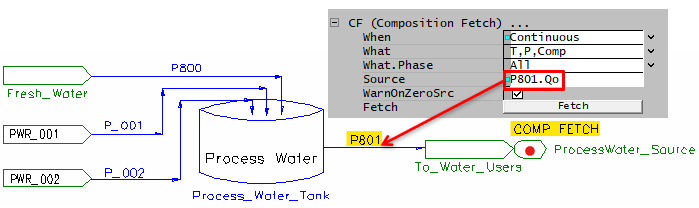
- You can use composition fetch to update the composition makeup of the makeup source.
- For example, you may want to update the Process Water Source composition to match that of the actual process water tank composition:
- Right click on the makeup source,
- On the Composition fetch section, change the settings as per the picture
- Set the Source to match the stream you would like to fetch from.
