Features
Navigation: General Information ➔ Features
| General Information | Features | Applications | Solver Mode and Add-On Options | License Options | Support and Services |
|---|
Latest SysCAD Version: 13 May 2026 - SysCAD Build 139.37082
User Interface
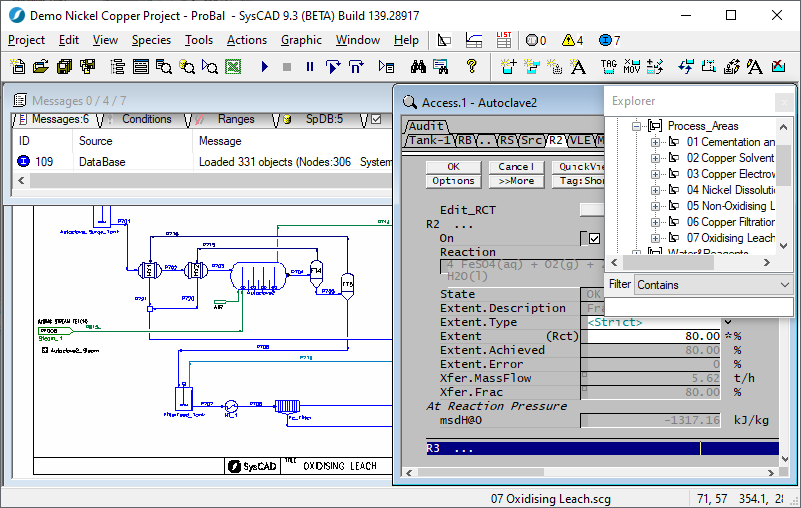
- SysCAD is a Windows application driven via pull down menus, toolbar buttons and mouse clicks.
- Different windows display the flowsheet, model specification data, trends and simulation data.
Hardware, OS and Software Requirements
- SysCAD is a 32bit Windows application. The recommended operating system is Microsoft Windows 11.
- SysCAD can still run on Windows 10 operating systems; however, this is not supported as Microsoft has ended support for Windows 10.
- SysCAD may run under the Windows 8.0, Windows 8.1 operating systems however this is not supported as Microsoft support for Windows 8 has ended.
- SysCAD is not supported on Windows 7 or older since Microsoft support for Windows 7 has ended.
- 32bit or 64bit Windows OS versions can be used.
- SysCAD does utilise multi-core processors as the solver utilises parallel processing (multi-threading). A multi-core processor should be used, a 4 core (or better) CPU is recommended.
- The use of a local SSD drive for loading and saving SysCAD projects is recommended. A HDD or SSD can be used. SysCAD install requires approximately 250MB.
- A minimum of 4GB of available RAM is required to run SysCAD. A PC with 16GB or more is recommended.
- A display resolution of 1080p (1920 × 1080) or better is recommended.
- A dual-screen setup is strongly recommended for SysCAD model developers.
- Having one display for full size SysCAD and one for other applications such as Excel, documentation, data, etc. is a significant enhancement for productivity.
- An accessible USB port for USB License Key when using a stand-alone license.
- SysCAD makes use of Microsoft Excel for reporting. It is recommended that Excel 2016 (V16) or newer is used.
- For editing reaction files used with SysCAD we recommend using the SysCAD Reaction Editor, which is included in the SysCAD install file.
- For editing of PGM files used with SysCAD we recommend using Microsoft VS Code with SysCAD Extension.
- For editing other text files used with SysCAD we recommend Notepad++ or VS Code.
- SysCAD can be used on Mac OS X where Parallels or similar is installed with a Windows virtual machine.
Library of Process Models
SysCAD has a library of many unit operation models from which the user can construct the process flowsheet. The unit models are categorised into the following types:
- General purpose - e.g. Tank, Pipe, Feeder, Tie, General controller and PID controller. These general models can be used in conjunctions with sub models such as reaction blocks and heat exchanger blocks to simulate a large number of processes.
- Single purpose unit operations - e.g. Filters, Heat Exchangers, Washer etc. These models will perform specific functions and are less versatile than the general purpose models, but are easy to use. The user need only specify minimal configuration data for the models to function correctly.
- Dynamic models - e.g. Pumps, conveyor belts, valves etc. These models are only used in the dynamic simulation mode.
- Industry related models - e.g. General Alumina models. The General Alumina model contains a generic Bayer Liquor Properties model for use when simulating an Alumina plant.
- User defined models - The user may request special models to be added for their sole use only.
Associated with each model is an icon and an access window. The access window allows the user to configure the models to reflect their process.
Please refer to Models for a complete list of models available in SysCAD and for help on the individual models.
Species / Chemical Compounds
- A species / Chemical compound is a constituent of the process such as water, ammonia, gold, etc.
- SysCAD provides a thermodynamic database of species, which can be customised by the user.
- When editing a species database for a project, the user can manually add data from many references; import data from other SysCAD project species databases; or import species data from the HSC Thermodynamic Database (Developed and sold by Outotec www.hsc-chemistry.com).
- The species database is defined by the user and is loaded at run time.
- SysCAD handles solid, liquid and vapour phases. These can be grouped further into "individual phases".
- The stream compositions are reported in all any unit operations and pipes within the model.
- Further individual species properties are reported on the Species Properties view.
Please refer to Section Species Table for more information on how to import and edit data.
Chemical Reaction Infrastructure
- The user may specify reactions in most units within SysCAD using the Reaction Block.
- The user defines chemical reactions in a text file. The user may use the SysCAD Reaction Editor (see Reaction Editor) or any text editor can be used to edit these reactions.
- The equations, extents and rates of reaction are specified in the reaction file, but these may be modified in SysCAD at run time.
- SysCAD provides stoichiometric checking on equations and is capable of solving many simultaneous reactions.
- SysCAD will determine if the reaction is exothermic or endothermic based on the thermodynamic data in the Species Database.
Data Input
An interface to Microsoft Excel provides a simple, user configurable data input facility. At run time, SysCAD can be instructed to read data from of Microsoft Excel spreadsheets. See Excel Set Tag Reports.
Data Output
SysCAD saves all model related data in an SQLite Database (ModelData.db3).
A number of data output formats are supported.
- Graphics - The flowsheets are stored as DXF files and can be printed using SysCAD or third party software. Annotation can be added.
- Reports - An interface to Microsoft Excel provides a comprehensive, user configurable report facility. Data exported from SysCAD to Microsoft Excel can be processed in the spreadsheet to calculate other data, e.g. running costs. See Excel Get Tag Reports.
- Trends - A trending facility is available whereby any variable in the flowsheet can be trended to a chart in a window or its time value written to a file. The historical data can be recalled on-line for examination or comparison with other data. Spreadsheet queries can be made to the trend historian to report responses of selected variables.
- Archiver - The Archive Reporter is used with Dynamic projects to report data directly to a database, CSV or text file while a project is running. The user specifies how many tables of data are required, the frequency of reporting (each table may be reported at a user specified time) and the tags that are reported in each table.
Engineering Units and Resolution
- Support is provided for a wide range of engineering units, please see Conversions Table for a full list of the conversions available and other information.
- The engineering unit and numerical resolution is selectable on a variable-by-variable basis.
Documentation
Users may include descriptions of units using the equipment memo field and they may also create hyperlinks between units and external documentation. See Documentation on the Info Tab page.
Graphical Representation of Process Flowsheet
The user may import a process flow diagram (in DXF format) or build one using typical CAD techniques in SysCAD. Icons of the different process units are selected from a library and positioned on the screen. What you see is what you model. The process units drawn are connected together with pipe models. SysCAD monitors the connectivity and formulates the equivalent mathematical model.
New graphics symbols can be easily added into the SysCAD symbols library to create more customised flowsheets as described in Graphics Symbols.
Once the flowsheet is solved, SysCAD uses colour codes to display the status of the unit operations in the simulation. Tags and annotation may be added to the graphics page. Simple animation (dynamic fill) can also be added to selected models under Dynamic mode.
Flowsheet Size
There is no limitation to the size of the flowsheet that can be modelled. The flowsheet can be divided into a series of drawings that can be run in any combination.
Simulation Speed and Robustness
- Users of SysCAD generally find the simulator to be very robust.
- It handles large complex flowsheets with numerous recycle streams.
- Configuration of estimates, initialisation or ranges is not required to assist the solver.
- In Steady State Mode, even a large simulation with over 2000 units can be solved within 10 minutes if properly tuned.
- In Dynamic mode, SysCAD can be operated using real time or accelerated time mode.
- Please note that the speed of simulation depends on the size and complexity of the process modelled, and the computer hardware used. SysCAD solver takes advantage of parallel processing on multi-core processors.
Control Simulation
- It is possible to superimpose both logical and analogue control on the flowsheet. This facility can be used to simulate interlocks, drive control logic, sequencing operations, manual and automatic operations.
- The user can write and test advance control strategies.
- SysCAD can be interfaced directly to Programmable Logic Controllers (PLC) and Distributed Control Systems (DCS).
- Please refer to Process Control Models and PGM for more information.
Connectivity (Control Systems & Operator Interfaces)
SysCAD has full OPC Server and OPC Client functionality, which is used in dynamic mode. Compliance with this industry standard allows SysCAD to easily be connected to a large number of 3rd party software and hardware systems. Briefly, OPC (Which stands for OLE for Process Control) is a standard to allow systems to communicate time stamped values of tags while running. It is through this mechanism that SysCAD Dynamic can be connected to various SCADA, OI, MMI, PLC and DCS systems.
Interactive Solver
The SysCAD simulation solver is fully interactive. This is essential in dynamic mode to respond to operator and other external interactions while running.
This is very useful while building and tuning a model in steady state to make changes, corrections and so on while solving.
Batch Run of What If? Scenarios
- SysCAD has a command script function, which can batch run multiple SysCAD simulations under varying operating conditions. For example, once a base case of SysCAD simulation is set up and solved, the user can set up such a file to read in feed conditions from MS Excel, solve the simulation, produce a report in Excel and repeat the process with other sets of data. The user can easily use this feature to perform feasibility studies and for cost analysis.
- The sensitivity analysis can also be done via COM automation.